
Featureless occasionally offers promotion codes that give you free or discounted access to the paid plan - for example, during launch periods or special announcements. This guide explains how promotion codes work, what to expect, and answers a few common questions.Documentation Index
Fetch the complete documentation index at: https://featureless.mintlify.app/llms.txt
Use this file to discover all available pages before exploring further.
How to use a promotion code
- Log in to your Featureless account
- Click the Upgrade button on the writing page
- You’ll be taken to a secure Stripe checkout page
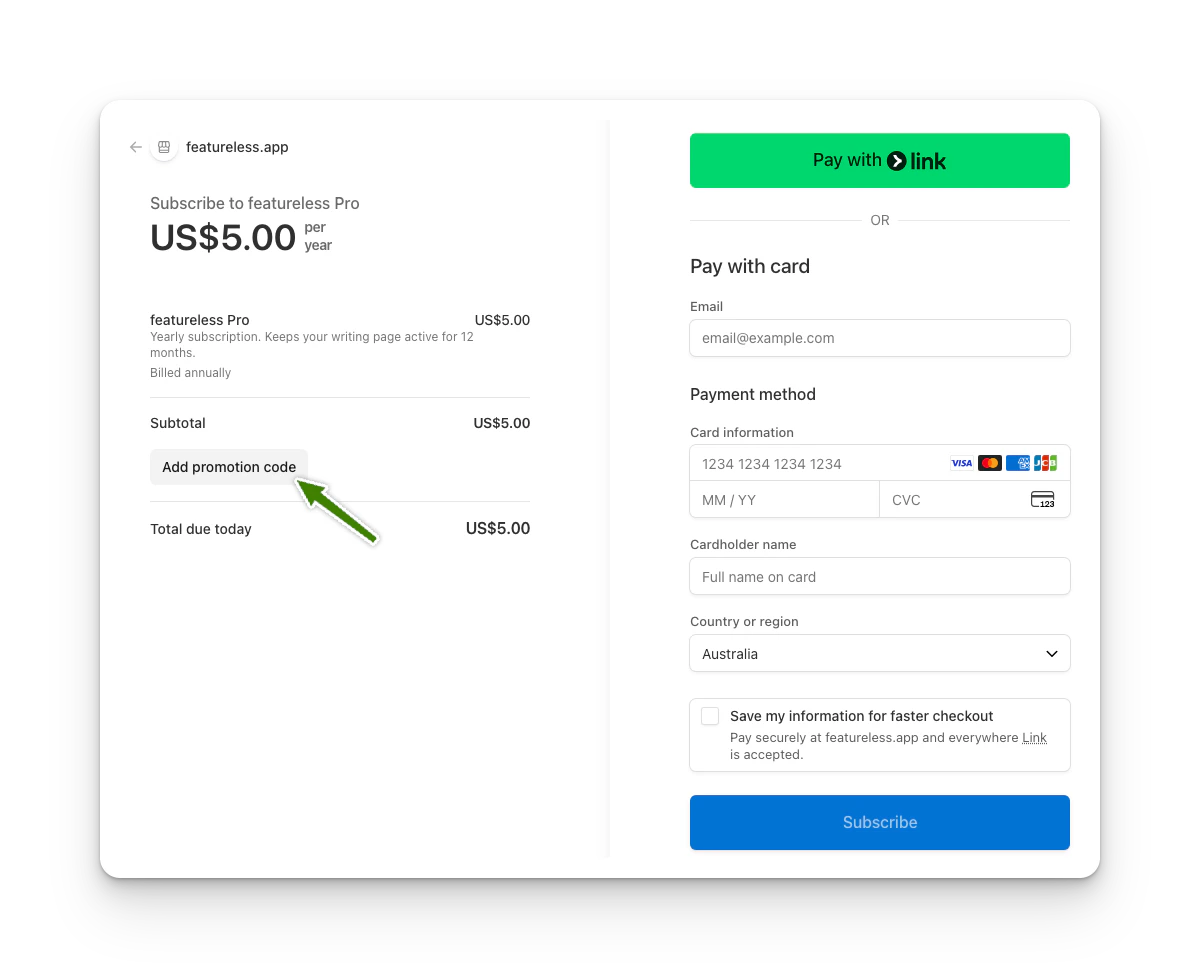
- On the checkout page, below the displayed price, look for the “Add promotion code” field
- Enter your promotion code and apply it
- Complete the checkout on the right (enter email, payment info, your name, region, etc, and click Subscribe)
I don’t see the promotion code field anymore - why?
This is normal behaviour. Stripe (our payment provider) remembers recent promotion code interactions within your browser session. If you:- Enter a promotion code
- Then leave the checkout page without completing payment
What can I do if the promo code field disappears?
You have a few easy options:- Open Featureless in an **incognito/private browser window **(this solution works most of the time)
- Use a **different browser **(this solution may not work sometimes, but give it a try)
- Complete checkout the first time you apply the code (this is the best solution!)
- If all of the above fail, then contact featureless and provide your name, the email ID you registered with, and the promo code you have on hand. We will attempt to apply the code on your behalf in the backend.
Do I need to enter the promotion code every year?
No. Promotion codes apply only during checkout. Once your subscription is active, you don’t need to re-enter anything unless you cancel and resubscribe later.Are promotion codes time-limited or usage-limited?
Yes. Promotion codes may have:- An expiry date
- A maximum number of redemptions
What happens after I upgrade?
- Your plan switches to Paid
- Your writing no longer expires
- The Upgrade button disappears
- You’ll see a message showing when your paid plan is active until
What if I apply a code but don’t finish checkout?
No changes are made to your account unless checkout is completed. Your writing remains untouched, and you can try again later.Still having trouble?
If something doesn’t look right, or you’re unsure whether a promotion code has been applied:- Try checkout in an incognito window
- Or reach out using the Contact link on the site or here